Why I switched from Arch to NixOS
 Ashpex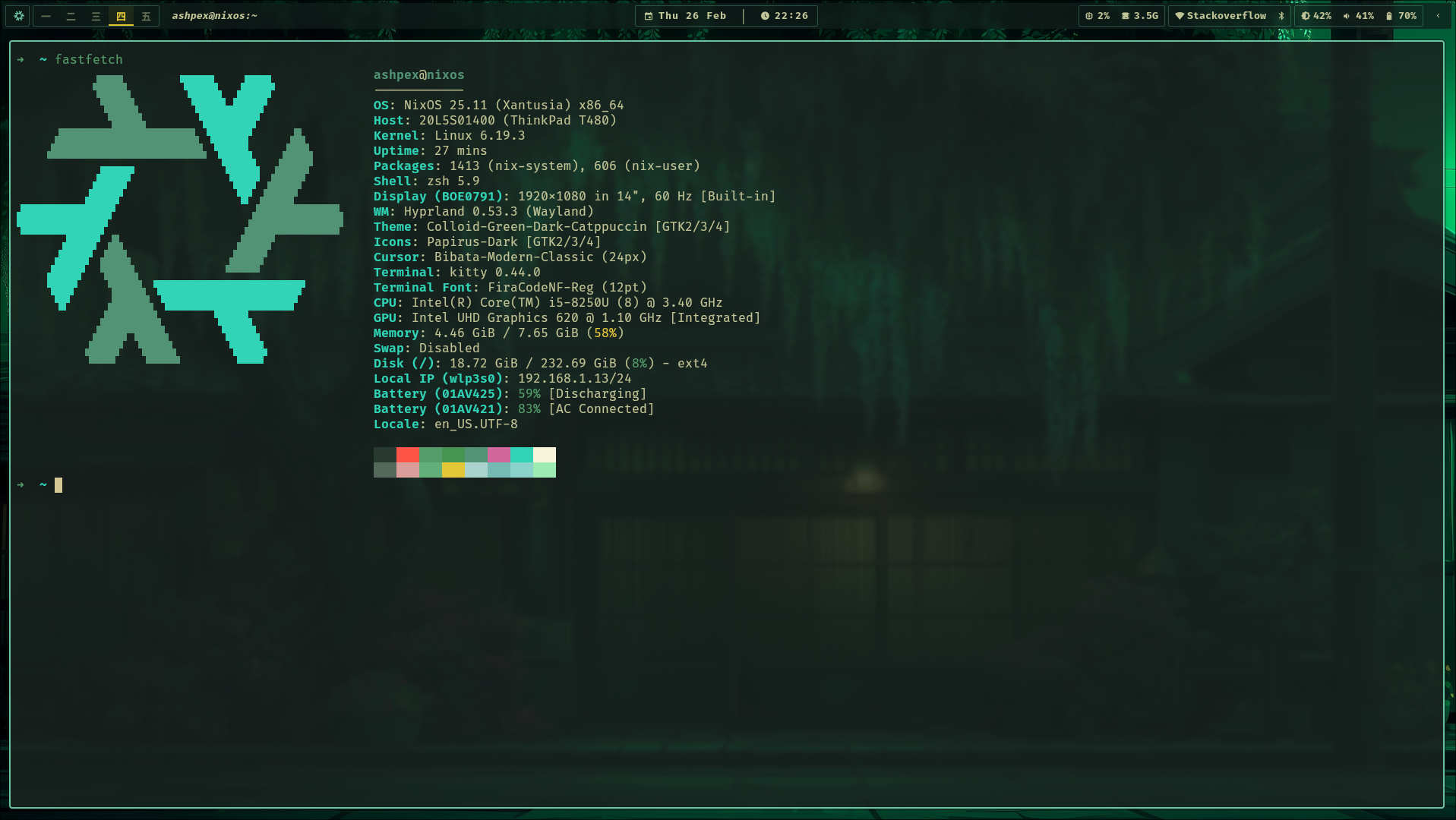
1 My problem with Arch and other Linux distros
I have been a proud Arch linux user since 2019. Six years. That’s the longest I’ve stuck with any distro, which is saying something considering I’ve hopped through Debian, Ubuntu, Mint, Pop!_OS, Manjaro… just like any normal linux distro hopper.
Arch is the one that stuck because for the first time, I finally had control over what gets installed on my desktop, instead of having to removing pre-installed apps I never asked for. Not to mention you can find basically any packages on AUR.
But like any other distros, there comes a time when I always question what packages did I install? Is it needed anymore? Should I uninstall anything to clean up the system?
I’d run pacman -Qqe and stare at the list. Half of it I recognized, half of it I had no idea. Did I actually install this xyz package? Or was it just a dependency?
I started avoiding new packages because I didn’t want more stuff I’d forget about later. And honestly, if my laptop died tomorrow, I don’t think I could rebuild this exact setup even if I tried.
That’s why I made a arch-install.sh script with the basics: base-devel, yay, i3, a couple of fonts, dev tools. But then… never touched it again.
I even wrote an Arch installation guide back in 2019 as a personal reference. And as you can guess, it quickly became outdated. That’s the problem right there - documentation only works if you remember to update it, and I never do (I doubt anyone does).
2 Infrastructure as code (again)
If you’ve seen me whining about IaC in recent posts, sorry about that 🫡. But at work I got a chance to learn Terraform. Managing infrastructure with declarative config files just makes sense: resources, IAMs, networks, everything in .tf files. Need to change something? Just update the file, run terraform apply, done. The infrastructure doesn’t drift because the code is the infrastructure. No separate documentation to keep in sync.
Same thing with my homelab server that I manage with Ansible (wrote about that here). The playbook is the documentation. It’s always current because it’s the thing that builds the system.

So while at work everything is declarative and reproducible, I’d come home to my Arch box and manually update a shell script I don’t even trust anymore.
3 NixOS: operating system as code
I’d heard about NixOS before but never had a real reason to try it until now. The idea of declaring your entire system in config files (packages, services, everything,…) sounded exactly like what I wanted. Still, it has a reputation for being difficult to learn.
Honestly, the learning curve wasn’t as bad as I expected. Whenever I hit a problem, Claude can actually get explanations that made sense. Few years ago this would’ve meant days of digging through scattered docs and GitHub issues.
The first few days were rough. I kept wanting to just pacman -S something and be done with it. But instead I had to add it to the config and rebuild. It felt slower than what I was used to.
But after a while, the benefit became clear. I know exactly what’s on my system because it’s all in the config. Packages, fonts and services are there because I put them there:
programs.neovim.enable = true # install neovim

systemd = {
  services = {
    NetworkManager-wait-online = {
      enable = false;
    };
  };
};

fonts.packages = with pkgs; [
  fira
  nerd-fonts.jetbrains-mono
  noto-fonts
];
No mystery about what’s installed. If it’s not in the config, it doesn’t exist. Weirdly calming.
Switching DE/WM is easier too. On Arch, if I want to try a different desktop environment, I install packages, configure it, test it out, then spend time hunting down everything to remove if I don’t like it. There’s always leftover stuff.
On NixOS, I just swap the DE module and rebuild. Here’s what that looks like:
nixosConfigurations = {
  t480 = nixpkgs.lib.nixosSystem {
    modules = baseModules ++ [
      ./gui.nix
      ./de/cinnamon.nix  # swap this for ./de/niri.nix
      ./hosts/t480
    ];
  };
}
Don’t like it? Switch it back, no junk left behind. And if I somehow break something while configuring a new DE, I can just boot into the previous generation and I’m back in 30 seconds.
4 Trade-offs
Here’s the thing though: NixOS is like an abstraction layer. Learning systemd or how packages work teaches you about Linux itself. Learning Nix teaches you about NixOS. It’s more like learning Terraform: useful for what it does, but learning Terraform doesn’t make you better at AWS or Kubernetes. Same with Nix - the knowledge doesn’t make you better at Linux in general.
I miss the AUR sometimes. Holy hell, the AUR. Nix has 120,000+ packages but the AUR has everything. Some niche stuff just isn’t in nixpkgs yet. Not to mention the Arch Wiki is still the best Linux documentation on the planet. NixOS docs are scattered by comparison.
But I for sure don’t miss wondering what’s on my system, or the reinstall script I never updated.
5 Final Thoughts
I’m done with distro-hopping. Not because NixOS is perfect. Its docs are still scattered and rebuilds are slower than I’d like, learning curve is real even with LLMs. But it’s the first distro that actually aligns with how I think about systems now: declarative and reproducible. The IaC philosophy from work rubbed off on me. Once you start thinking that way, it’s hard to go back to manually tracking shell scripts.
If you’re happy with Arch or any other linux distro, you probably don’t need NixOs. But if you’ve maintained a reinstall script and watched it slowly become worthless, or if you want your desktop to be reproducible… might be worth a try.
Here are my NixOS config repos: nixos-config and nixos-dotfiles, inspired by my colleague Khue Doan.
And lastly, as a tribute to my trusty ThinkPad T480, here’s a screenshot of it running NixOS (Hyprland, Waybar, Kitty):
 Support Me on Ko-Fi.com